How to Create a GST Invoice for Freelancers in India (Step by Step)
Introduction If you’re a freelancer in India, creating a GST-compliant invoice is not just about getting paid—it’s about staying legally compliant and building credibility with your clients. A well-structured…
Introduction
If you’re a freelancer in India, creating a GST-compliant invoice is not just about getting paid—it’s about staying legally compliant and building credibility with your clients. A well-structured GST invoice ensures smooth payments, avoids legal issues, and helps your clients claim tax benefits.
In this guide, you’ll learn exactly how to create a GST invoice step by step, along with all the mandatory details you must include.
Why freelancers need GST invoices
Many freelancers assume invoicing is simple—but GST adds an important layer of compliance.
Here’s why GST invoices are essential:
- Mandatory if you are GST registered
- Required by most companies and corporate clients
- Enables clients to claim Input Tax Credit (ITC)
- Helps maintain proper financial records
- Builds professionalism and trust
When Do Freelancers Need to Register for GST?
You must register for GST if:
- Your annual turnover exceeds ₹20 lakh (₹10 lakh in special category states)
- You provide interstate services
- You sell services through online platforms
👉 Even if registration is not mandatory, many freelancers choose to register to work with high-value clients and agencies.
Mandatory Details in a GST Invoice
A valid GST invoice must include the following:
- Your name or business name
- GSTIN (GST Number)
- Unique invoice number
- Invoice date
- Client details (name, address, GSTIN if applicable)
- Description of services
- Taxable value
- GST rate (CGST + SGST or IGST)
- Total invoice amount
- Place of supply
Missing any of these can make your invoice non-compliant.
Step-by-Step: How to Create a GST Invoice
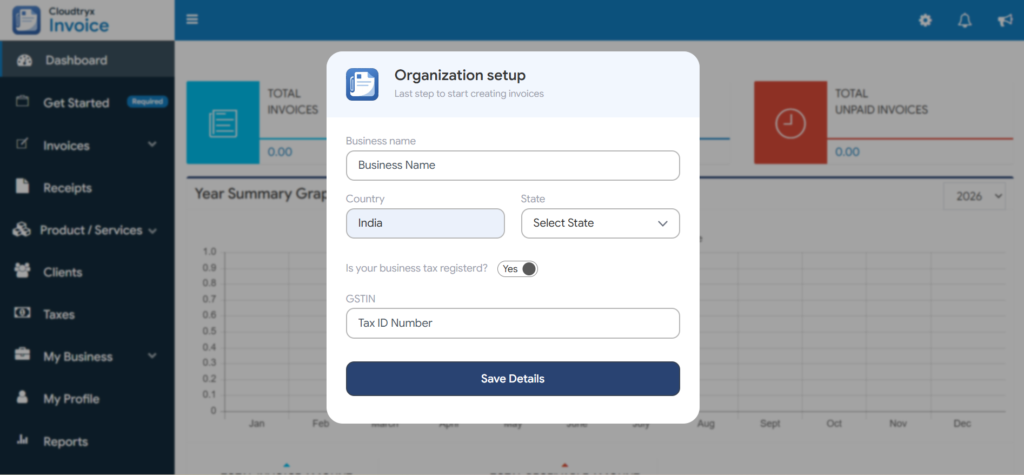
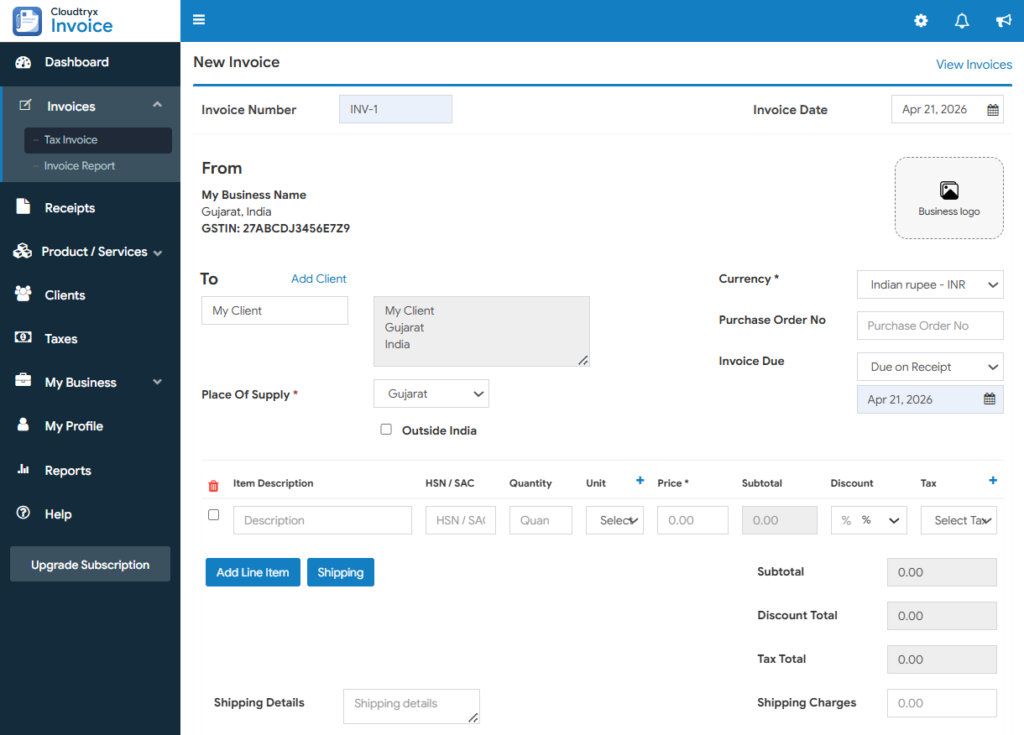
Step 1: Add your business details
- Your name or business name
- GSTIN (if registered)
- Business address
Step 2: Add client details
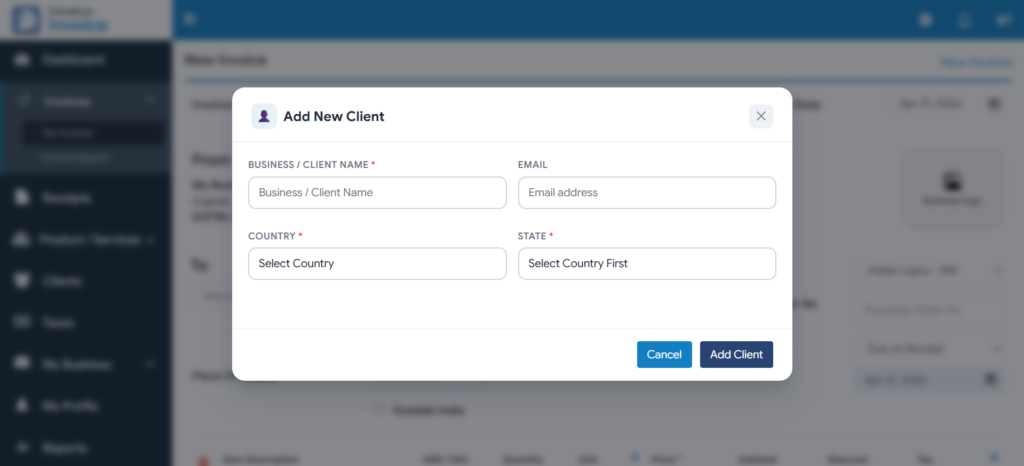
- Client name
- Address
- GSTIN (if applicable)
Step 3: Add Service Details
- Service description (e.g., Web Development Services)
- HSN Code of the service or product
- Quantity (if applicable)
- Rate per unit
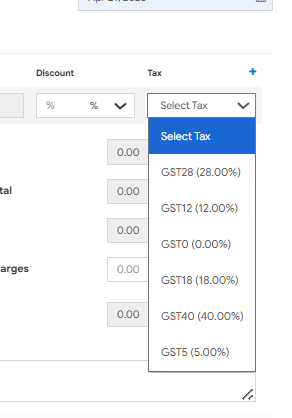
Step 4: Apply GST
- Within state: GST (CGST + SGST)
- Outside state: IGST
Example:
- Service Amount: ₹10,000
- GST @ 18%: ₹1,800
- Total Invoice: ₹11,800
Step 5: Generate and Share the Invoice
- Create invoices manually (time-consuming and error-prone)
- Or use an automated tool for faster and accurate invoicing
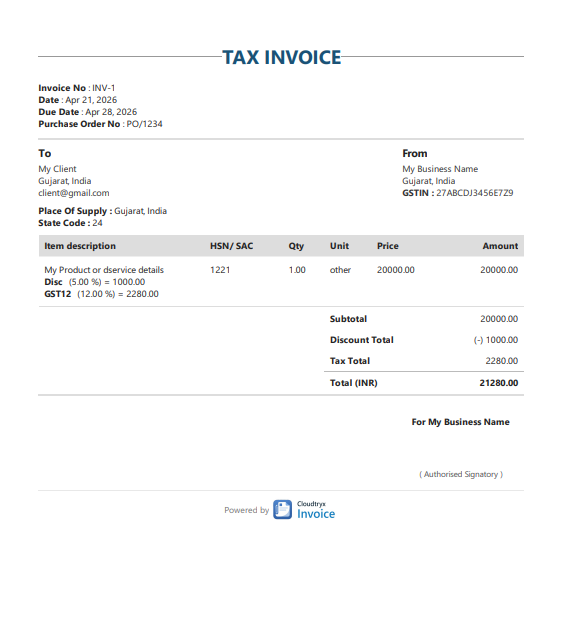
With tools like Cloudtryx Invoice, you can:
- Add details quickly
- Auto-calculate GST
- Download professional PDFs instantly
Common GST Invoice Mistakes Freelancers Should Avoid
Avoid these common errors:
- Missing GSTIN
- Incorrect GST calculations
- Wrong place of supply
- No unique invoice number
- Using a non-GST format
These mistakes can lead to compliance issues and payment delays.
Frequently Asked Questions (FAQ)
1. Do freelancers need to issue GST invoices for every client?
Yes, if you are GST registered, every invoice must be GST-compliant.
2. Can I create GST invoice without GST number?
No. GST invoice requires a valid GSTIN.
3. What GST rate applies to freelancers?
Most services fall under 18% GST.
4. Is invoice mandatory for freelancers?
Yes. It is essential for accounting, taxation, and legal compliance.
5. Can I use free tools for GST invoices?
Yes. Tools like Cloudtryx Invoice make invoice creation fast and simple.
Conclusion
Creating a GST invoice as a freelancer doesn’t have to be complicated.
Once you understand the structure, you can:
- Stay compliant with GST laws
- Get paid faster
- Present yourself professionally
👉 To save time and avoid errors, consider using a simple invoice generator that helps you create GST invoices in seconds.
And if you want to simplify the process:
Use a simple invoice generator to create GST invoices in seconds.